1
เตรียมบัญชี meta.ai สำรอง
ใช้บัญชีที่ไม่ใช่บัญชีหลักของคุณ เพราะการเข้าแบบอัตโนมัติมีโอกาสโดนระงับบัญชี
อย่าใช้บัญชีหลัก ที่ผูกเพจหรือร้านค้าของคุณ
ให้ Claude Code สั่ง meta.ai เจนภาพและวิดีโอแทนคุณ พร้อม prompt ภาพ 8 แบบที่ผมลองจริงทุกอัน และ prompt ภาพเป็นวิดีโออีก 5 แบบ ทำตามทีละขั้นในหน้านี้ได้เลย
 Claude Code
 meta.ai
✓ prompt ทดสอบแล้ว 2026-09-24
ไม่อยากเขียนโค้ด ก็มีทางให้
meta.ai
✓ prompt ทดสอบแล้ว 2026-09-24
ไม่อยากเขียนโค้ด ก็มีทางให้
 8 prompt ภาพ + 5 วิดีโอ
ส่วนตัวเชื่อมนี้ไม่เป็นทางการเลย
ถ้าไม่อยากเสี่ยงเลย เลือกทาง B ข้างล่าง แล้วพิมพ์ prompt เองในเว็บได้เลย
เลือกแล้วเปลี่ยนใจได้ตลอด · เว็บจำว่าคุณทำถึงขั้นไหน
คุณไม่ต้องเขียนโค้ดเอง แค่ก๊อป prompt ไปวาง Claude Code จะสร้างโปรแกรมที่เปิดเว็บจริงแล้วเจนภาพและวิดีโอแทนคุณ
ใช้บัญชีที่ไม่ใช่บัญชีหลักของคุณ เพราะการเข้าแบบอัตโนมัติมีโอกาสโดนระงับบัญชี
สร้างโฟลเดอร์ใหม่ไว้สำหรับตัวเชื่อมนี้โดยเฉพาะ แล้วเปิด Claude Code ในโฟลเดอร์นั้น ไฟล์ทั้งหมดจะได้อยู่ที่เดียว ไม่ปนงานอื่น
กดปุ่ม ก๊อปทั้งก้อน แล้ววางใน Claude Code ได้เลย ไม่ต้องแก้อะไร
Build a small local connector that lets me drive meta.ai image and video generation from my own computer. Use Node.js plus Playwright driving a real Chrome browser. Do not use any secret or private API. Do not call GraphQL directly because the community CLI approach that called GraphQL directly is broken now that meta.ai moved message sending to WebSocket, so only drive the visible website like a human would.

Requirements for the connector:

1. Provide a `login` command. It must open a visible browser window on meta.ai and ask me to log in myself with a backup account. Never ask for or accept my password. After I finish logging in, save the session with Playwright storageState as a session file in the user folder so later runs can reuse it.

2. Provide a `status` command. It must check that a saved session exists and that a cookie named ecto_1_sess is present. If either is missing, tell me to run login again.

3. Provide an `image --prompt "..." --out name` command. It must open meta.ai with the saved session, wait for the composer textbox ([role="textbox"]), fill my prompt with keyboard.insertText because typing long prompts character by character is too slow, then press Enter. Then poll every 2 to 3 seconds for a new <img> element that was not there before sending. Download the image from its src into an output folder with a file name that includes the date. Use a timeout around 180 seconds.

4. Support a `--ref` option with image generation. When I pass a reference photo, attach it to the composer first and wait until its preview appears before typing the prompt and sending.

5. Provide a `video --prompt "..."` command. It works the same way but waits for a <video> element whose src is an .mp4 file, then downloads it. Use a timeout around 300 seconds.

6. Locate elements by what the user sees such as roles and visible text. Do not hardcode CSS class names. If an element is not found, run in visible mode with --headed and take a screenshot for debugging.

7. Keep a polite pace. Wait between jobs and never fire many requests in a burst, to lower the risk to the account.

8. After you finish building, test it for real in this order: login, then status, then generate 1 test image, then open the file and show it to me. Fix anything that fails before you say it is done.
พอ Claude สร้างเสร็จ มันจะรันคำสั่ง login แล้วเปิดหน้าต่างเบราว์เซอร์ meta.ai ขึ้นมา คุณล็อกอินด้วยบัญชีสำรองในหน้าต่างนั้นเอง
ล็อกอินเสร็จ ตัวเชื่อมจะเก็บ session ไว้ รอบหน้าไม่ต้องล็อกอินใหม่
Claude จะทดสอบจริงตามลำดับนี้ แล้วเปิดภาพทดสอบให้คุณดู
ถ้ามีขั้นไหนพัง มันต้องแก้ให้ผ่านก่อนถึงจะบอกว่าเสร็จ คุณแค่รอดูผล
จากนี้คุณพิมพ์บอก Claude ได้เลย เช่น
เจนปกโพสต์เรื่องข้าวเหนียวมะม่วง 4 แบบด้วยตัวเชื่อม meta.ai แล้วเอามาให้ดู
เอารูปสินค้าที่แนบไปเจนภาพบนพื้นหลังสตูดิโอ 3 แบบ
เจนคลิปสั้นจากภาพที่เลือกมา 1 คลิป
คำสั่งที่ตัวเชื่อมมีให้ (Claude เรียกให้เองเวลาคุณสั่งเป็นภาษาคน)
login | เปิดเว็บให้ล็อกอินเองแล้วเก็บ session |
status | เช็คว่า session ยังอยู่ไหม |
image --prompt "..." | เจนภาพ แล้วดาวน์โหลดเป็นไฟล์มีวันที่ |
--ref | แนบรูปอ้างอิง เช่น รูปสินค้าจริง |
video --prompt "..." | เจนวิดีโอ แล้วดาวน์โหลดเป็น .mp4 |
เปิด meta.ai ในเบราว์เซอร์แล้วล็อกอิน จากนั้นเลื่อนลงไปเลือก prompt ในส่วนที่ 2 ก๊อปไปวางในช่องแชทได้เลย
พิมพ์เองในเว็บก็ได้ ใช้กับตัวเชื่อมก็ได้ ทุกอันขึ้นต้นว่า Imagine a vertical 4:5 ภาพข้างล่างคือผลจริงตอนผมลอง กดดูภาพใหญ่ได้
เลือก prompt สัก 1 อันข้างล่าง กดก๊อป แล้ว
ได้ภาพแล้วลองแก้คำตรงที่บอกว่า "แก้ได้" ให้เป็นของร้านคุณเอง
 1✓ ทดสอบแล้ว
ภาพเปิดร้านอาหารหรือภาพประกอบโพสต์เล่าเรื่อง
Imagine a vertical 4:5 Thai street food stall at night, mango sticky rice in banana leaf, warm light, style like early 2000s 3D animation
 2✓ ทดสอบแล้ว
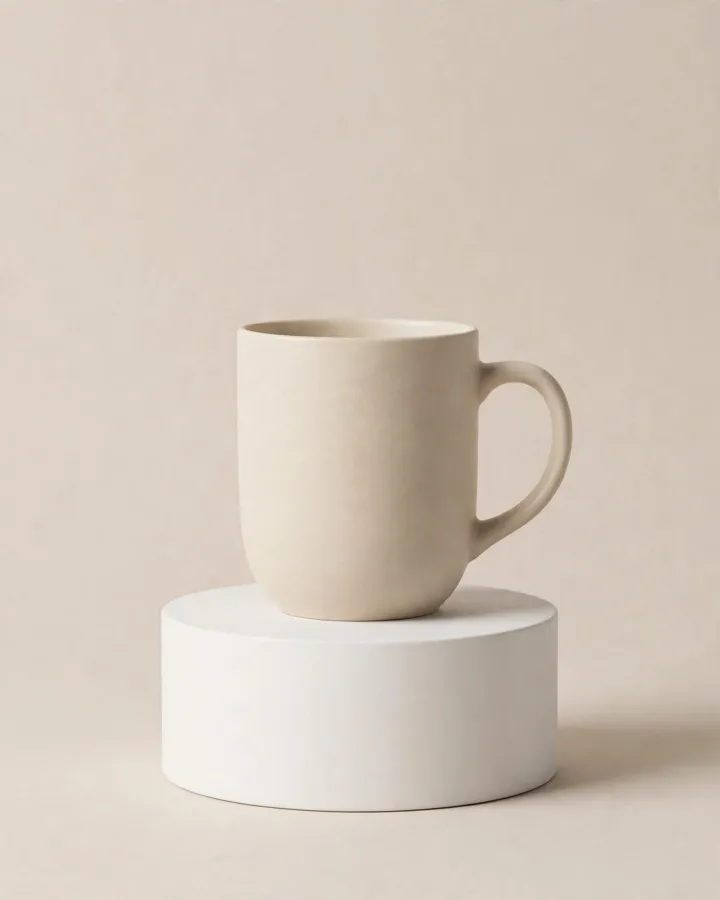
ภาพสินค้าสะอาดๆ พร้อมลงขาย
Imagine a vertical 4:5 ceramic coffee mug on a clean studio pedestal, soft beige background, gentle shadow, minimal product photo style
 3✓ ทดสอบแล้ว
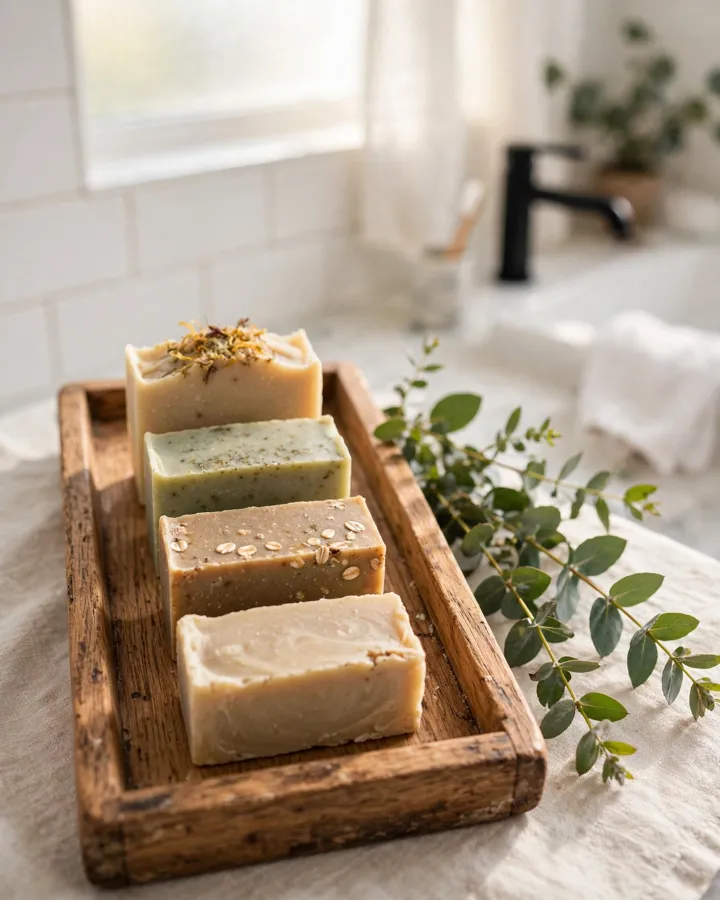
โชว์ว่าสินค้าอยู่ในชีวิตจริงแล้วเป็นยังไง
Imagine a vertical 4:5 handmade soap bars on a wooden tray beside green leaves in a bright bathroom, morning light, cozy lifestyle photo style
 4✓ ทดสอบแล้ว
ปกโพสต์ที่มีข้อความไทยด้านบน
Imagine a vertical 4:5 cozy noodle shop with a steaming bowl on the table, with a bold Thai headline "อร่อยเหมือนแม่ทำ" at the top, friendly poster style
AI แต่งราคาบนป้ายเมนูเล็กๆ เพิ่มมาเอง เช็คก่อนใช้
 5✓ ทดสอบแล้ว
ลงเมนูหรือโพสต์เรียกลูกค้าเข้าร้าน
Imagine a vertical 4:5 iced Thai milk tea and croissant on a wooden cafe table by the window, sunlight flare, warm cafe photo style
 6✓ ทดสอบแล้ว
ตัวการ์ตูนประจำร้าน ใส่ปกหรือทำสติกเกอร์
Imagine a vertical 4:5 cute cat shop mascot in a green apron holding a shopping bag, standing in front of a small store, cheerful cartoon style
AI ตั้งชื่อร้านภาษาอังกฤษให้เอง ใส่ชื่อร้านคุณในเครื่องหมายคำพูดเพื่อกำหนดเอง
 7✓ ทดสอบแล้ว
ประกาศโปรลดแลกแจกแถม
Imagine a vertical 4:5 promotion poster for fresh fruit juice with scattered oranges and a glass bottle in the center, with a bold Thai headline "ซื้อ 1 แถม 1" at the top, bright sale poster style
AI แต่งข้อความเพิ่มเอง (วันหมดโปร, "100%") ลบหรือแก้ให้ตรงร้านก่อนใช้
 8✓ ทดสอบแล้ว
ใช้เป็นพื้นหลัง แล้วใส่ข้อความเองทีหลัง
Imagine a vertical 4:5 soft pastel sky with clouds over a calm rice field, large empty space at the top for text, lower half with field and a small hut, clean illustration style
วิดีโอที่ตัดต่อได้ยาวสุด 10 วินาที ตามที่ทางการบอก
ปล่อยช่อง prompt ว่างก็ได้ จะได้อนิเมชันมาตรฐาน ใส่เพลงได้ด้วย แล้วมีปุ่ม Extend กับ Restyle ให้เล่นต่อ
ภาพอาหารร้อนให้ดูน่ากินขึ้น
Steam rising slowly, camera gently zooms in
ภาพสินค้าบนพื้นหลังสตูดิโอให้ดูพรีเมียมขึ้น
Product rotating slowly, soft light sweep
ภาพมาสคอตหรือภาพคนให้ดูเป็นกันเองขึ้น
Person turns to camera and smiles softly
ภาพบรรยากาศร้านหรือภาพวิวให้ดูมีชีวิตขึ้น
Leaves swaying in a light breeze, subtle camera drift
ภาพโปสเตอร์โปรโมชันให้ดูตื่นเต้นขึ้น
Sparkles floating up, festive glow pulsing
ทางการแนะนำให้เริ่มด้วย imagine หรือ create an image แล้วยิ่งเล่าละเอียดยิ่งได้ตรง
อยากได้ภาพแนวตั้งพร้อมโพสต์ ผมลองแล้วได้ขนาดประมาณ 1408×1760 พอดีฟีด
รูปอ้างอิงช่วยยึดหน้าตาสินค้าให้เพี้ยนน้อยลง
ส่วนใหญ่ถูก แต่เช็คเว้นวรรคเกินกลางคำ กับตัวหนังสือเล็กแปลกปลอมที่ชอบโผล่มา
ภาพที่เจนจากผลิตภัณฑ์ของ Meta จะมีป้ายบอกว่าเป็น AI บางฟีเจอร์อาจยังไม่มีในบางพื้นที่
login ใหม่ แล้วล็อกอินเองในหน้าต่างที่เด้งขึ้นมาอีกรอบ--headed แล้วถ่าย screenshot ดูว่าหน้าเว็บเป็นยังไง ตัวเชื่อมถูกสั่งให้หาปุ่มจากสิ่งที่มองเห็น มันจะปรับตามได้ได้ภาพสวยๆ แล้วเอามาอวดกันในคอมเมนต์ที่เพจได้นะ แล้วติดตามไว้ ชุดแจกต่อไปจะมาอีกเรื่อยๆ